# MarginNote for Raycast
URL: https://www.raycast.com/ourongxing/marginnote
> Search MarginNote notebooks, quickly take notes under a chosen parent note, and restart MarginNote skipping the unsigned add-on alert.
- Install: raycast://extensions/ourongxing/marginnote
- Author: [Ou](https://www.raycast.com/ourongxing)
- Installs: 909
- Platforms: macOS
- Categories: Applications, Productivity
- Updated: 2026-11-18
- Source: https://github.com/raycast/extensions/tree/eb711e05870440e012d06bfeb43fea8c0319b9c4/extensions/marginnote/
## Commands
- **Search Notebook**: Search notebook in MarginNote
- **Take Note**: Take note quickly. The note will be created as a child of the parent note that you set.
- **Restart Application**: Restart MarginNote and skip the unsigned mnaddon alert
## README
### Raycast Extension of MarginNote
[ [简体中文](https://github.com/raycast/extensions/raw/eb711e05870440e012d06bfeb43fea8c0319b9c4/extensions/marginnote//README-ZH.md) ]
#### Usage
##### First of All
There are options to help you automatically skip alerts for unsigned mnaddon when opening MarginNote through this extension.
1. Skip Alert: As mentioned above.
2. Waiting Time: Wait for MarginNote to open.
##### Search Notebook
> **Note**
>
> Please install [Raycast Enhance](https://github.com/marginnoteapp/raycast-enhance/releases) addon and latest MarginNote 3 (^3.7.21). If the `Raycast Enhance` addon is still uncerfitied, maybe you need turn `Allow uncertified extensions` on in MarginNote.
> 
Search notebook by name and Open directly. Support mindmap noteboook and flashcard notebook.
##### Take Note
Usually to be used to excerpt some text from other apps and take note in MarginNote.
**features**
- Excerpt selected text automatically.
- Excerpt browser url automatically, support `Safari`, `Arc`, `Chrome`, `Edge`.
**settings**
- Show confetti when creating note successfully to celebrate.
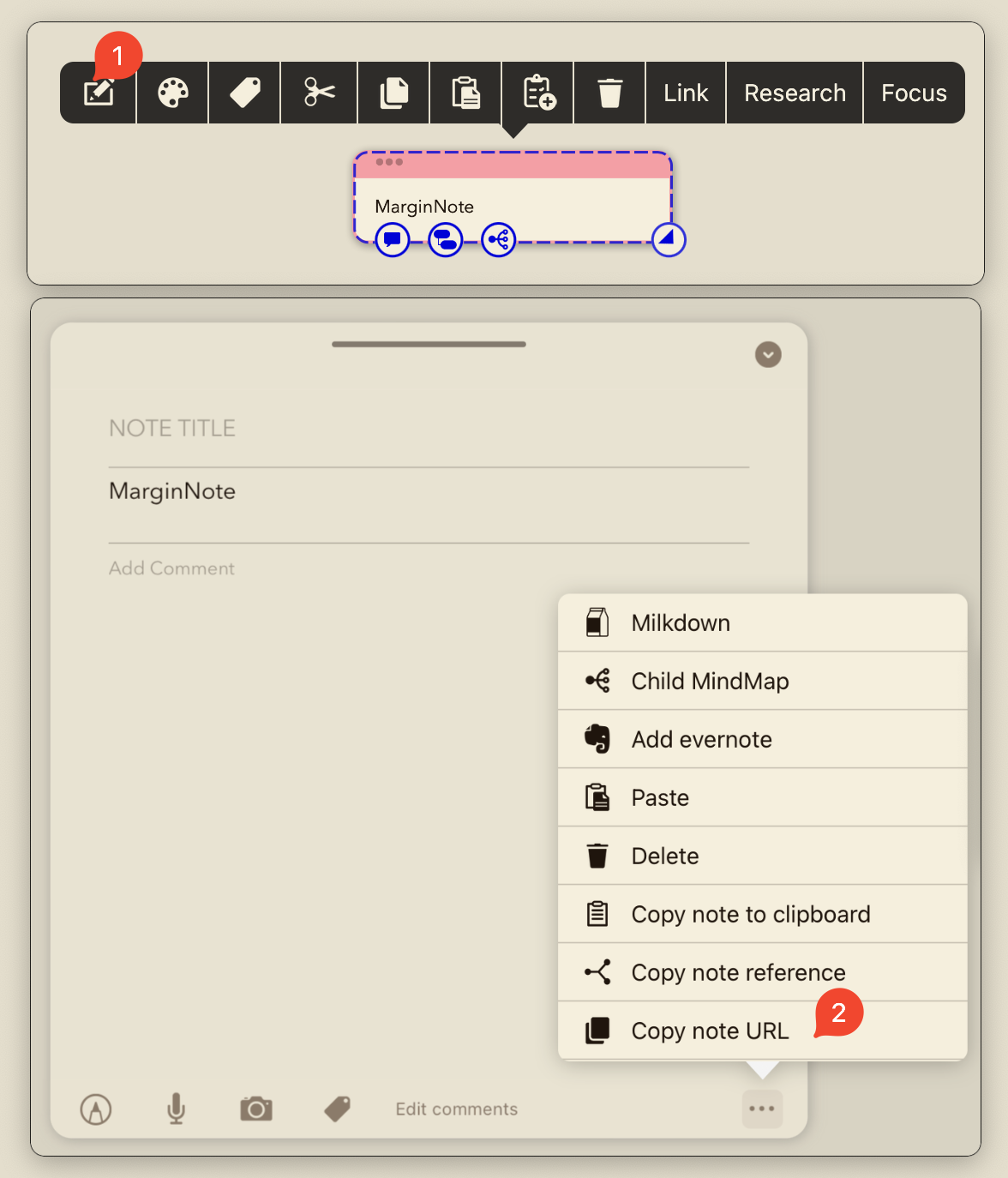
- You can set 5 parents note url, and the new note will be created as a child note. Alias can be set by `alias=url`
> **Note**
>
> If you don't know how to get the note url, just follow the picture step by step.
>
> 
- You can set common tags as many as you want.
##### Restart MarginNote
Restart MarginNote quickly. It's helpful when you develop mnaddon.
#### License
MIT © 